- Welcome to Freedom Reborn.

Games, Comics, Superheroes, . . .
Recent posts
#31
Hex Editing / Re: What've you skoped lately?
Last post by WyldFyre - April 26, 2026, 09:41:25 PMMafia Dons indeed!
#32
Freedom Force Discussion / Re: Digital Dioramas
Last post by WyldFyre - April 26, 2026, 09:40:21 PMI know. Couldn't remember the spelling. 
#33
Mods / Re: Map lighting
Last post by cranlox - April 26, 2026, 09:03:13 PMI think the problem might be that I never installed the game "officially," but rather copied an old installation to a new computer. Without a fresh installation from my discs, it might not be set up correctly.
I did the same thing, but I have the original CD and I don't currently have a CD drive, haha.
Anyway, I think it's standard maps.
I did the same thing, but I have the original CD and I don't currently have a CD drive, haha.
Anyway, I think it's standard maps.
#34
Requests for Skins and Meshes / Re: Possible Projects Interest
Last post by cranlox - April 26, 2026, 08:59:58 PMQuote from: Randomdays on April 26, 2026, 08:26:48 PMGargoyles Pack 3
Even more non Gargoyles!
All meshes and skins by Cranlox
These always seem to be complicated with the robes, cloaks, wings and tails. Trying to do them on a mesh that uses wings would be even more so.
Princess Catherine - Rigged to female basic. Adjusted the mesh to separate the sleeves from the body
Magus - Rigged to male_basic. Adjusted the mesh to separate the sleeves from the body
Talon - Rigged to male_basic. Lengthened the tail
Maggie - Rigged to female_basic. Adjusted the mesh to separate the legs. Adjusted the mesh to separate the wings from the elbows. Adjusted the mesh where both ends of the tail were joined to the body.
uploaded to the Dizney folder
I didn't think you were into these characters. Yesterday I sent you a message early and then I saw that for some reason it didn't go through or wasn't sent, so I sent it again with the last groups I sent you.
I never thought Talon and Maggie could be playable in anything, great contribution friend!
#35
Requests for Skins and Meshes / Re: Possible Projects Interest
Last post by Randomdays - April 26, 2026, 08:26:48 PMGargoyles Pack 3
Even more non Gargoyles!
All meshes and skins by Cranlox
These always seem to be complicated with the robes, cloaks, wings and tails. Trying to do them on a mesh that uses wings would be even more so.
Princess Catherine - Rigged to female basic. Adjusted the mesh to separate the sleeves from the body
Magus - Rigged to male_basic. Adjusted the mesh to separate the sleeves from the body
Talon - Rigged to male_basic. Lengthened the tail
Maggie - Rigged to female_basic. Adjusted the mesh to separate the legs. Adjusted the mesh to separate the wings from the elbows. Adjusted the mesh where both ends of the tail were joined to the body.
uploaded to the Dizney folder
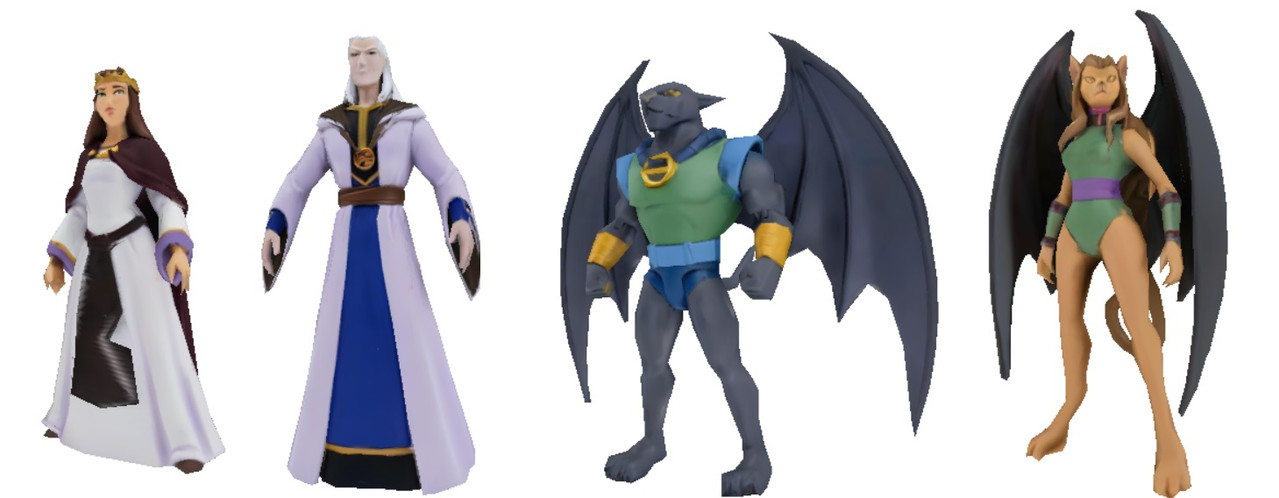
Even more non Gargoyles!
All meshes and skins by Cranlox
These always seem to be complicated with the robes, cloaks, wings and tails. Trying to do them on a mesh that uses wings would be even more so.
Princess Catherine - Rigged to female basic. Adjusted the mesh to separate the sleeves from the body
Magus - Rigged to male_basic. Adjusted the mesh to separate the sleeves from the body
Talon - Rigged to male_basic. Lengthened the tail
Maggie - Rigged to female_basic. Adjusted the mesh to separate the legs. Adjusted the mesh to separate the wings from the elbows. Adjusted the mesh where both ends of the tail were joined to the body.
uploaded to the Dizney folder
#36
Mods / Re: Map lighting
Last post by Randomdays - April 26, 2026, 06:49:41 PMFor anybody else reading through this, my FFX3 runs from the shortcut and the control center works, but I'm getting the wrong directory problem. I've tried various fixes mentioned on the forums -uninstalling, runniing the game and re-installing, and went into regedit and changed everything to my directory - which is simply "C:\\Freedom Force 3R"
Didn't work.
I think the problem might be I don't think I ever "Officially" installed the game, but copied an old install to a new computer. without a new install from my discs, it might not be configured correctly.
I haven't tried going into a hex editor that Alex mentioned when he had the problem.
Didn't work.
I think the problem might be I don't think I ever "Officially" installed the game, but copied an old install to a new computer. without a new install from my discs, it might not be configured correctly.
I haven't tried going into a hex editor that Alex mentioned when he had the problem.
#37
Mods / Re: Map lighting
Last post by Randomdays - April 26, 2026, 06:23:48 PMtry that first - it just points the game to the map pack directory when you run the game so you can play them in game.
according to the readme, your hero files won't be available unless you run the control center, but I think it writes them into the new map pack directory.
For sounds and fx, they might be available - I'm not sure.
I'm not an expert on FFX, but as far as I can tell it doesn't rewrite anything you have. When you run it, it runs like a mod as a separate version of the game. Your new items might not show up if they're not added to the mod. If you look in the map folder, besides maps it has copies of a lot of the game data in it.
For me, I can't get FFX3 to run correctly since I have the problem of the control center pointing to the wrong directory and can't fix it.
according to the readme, your hero files won't be available unless you run the control center, but I think it writes them into the new map pack directory.
For sounds and fx, they might be available - I'm not sure.
I'm not an expert on FFX, but as far as I can tell it doesn't rewrite anything you have. When you run it, it runs like a mod as a separate version of the game. Your new items might not show up if they're not added to the mod. If you look in the map folder, besides maps it has copies of a lot of the game data in it.
For me, I can't get FFX3 to run correctly since I have the problem of the control center pointing to the wrong directory and can't fix it.
#38
Mods / Re: Map lighting
Last post by cranlox - April 26, 2026, 05:33:38 PMQuote from: Randomdays on April 26, 2026, 04:23:31 PM
If you haven't, change the shortcut the pack gave you.
Open properties on the "ffx_mappack.lnk" shortcut to point to your directory
Target line "Nuevo vol C:\RECREATIVO\FF VS 3 R\FREEDOM FORCE REBIRTH\ffvt3r.exe" -game ffx3_Mappack -log"
Start in "Nuevo vol C:\RECREATIVO\FF VS 3 R\FREEDOM FORCE REBIRTH"
If you put a copy of the shortcut on the desktop, you should be able to click it and start the game with the map pack active.
and not re write the sounds fx and herofiles?
#39
Mods / Re: Map lighting
Last post by Randomdays - April 26, 2026, 04:23:31 PM If you haven't, change the shortcut the pack gave you.
Open properties on the "ffx_mappack.lnk" shortcut to point to your directory
Target line "Nuevo vol C:\RECREATIVO\FF VS 3 R\FREEDOM FORCE REBIRTH\ffvt3r.exe" -game ffx3_Mappack -log"
Start in "Nuevo vol C:\RECREATIVO\FF VS 3 R\FREEDOM FORCE REBIRTH"
If you put a copy of the shortcut on the desktop, you should be able to click it and start the game with the map pack active.
#40
Mods / Re: Map lighting
Last post by cranlox - April 26, 2026, 03:57:24 PM
I extracted the folder to my FFvS3R directory, and I have the FFEdit program running with all my modified Herofiles, sounds, and effects files. From what I saw at one point, I think I had those maps a long time ago; I remember the wrestling one.